
ASP.NET Core 10: New OpenTelemetry metrics for Identity
Introduction
ASP.NET Core has been shipping built-in OpenTelemetry meters for hosting, Kestrel, routing, and rate limiting for a while now. These cover the HTTP layer well, but they’ve always stopped short of telling you what happened inside the authentication and identity layer. A request hits /account/login, returns a 200, great, but did the sign-in succeed? Was the user locked out? Did a 2FA challenge fire?
ASP.NET Core 10 closes that gap with a new Microsoft.AspNetCore.Identity meter that tracks user management operations, sign-in attempts, token flows, and 2FA events. Combined with the also-new Microsoft.AspNetCore.Authorization meter, you now get instrumented coverage from the HTTP request all the way through to authorization decisions, no custom code needed.
Wiring it up
If you already have OpenTelemetry configured, adding Identity metrics is just one extra line in your AddMeter call:
That’s it. No custom counters to maintain, no manual instrumentation. The Identity middleware emits the metrics automatically as users sign in, sign out, generate tokens, etc.
The full list of metrics
The Microsoft.AspNetCore.Identity meter covers two broad categories: user management and sign-in / session handling. Here’s what ships out of the box.
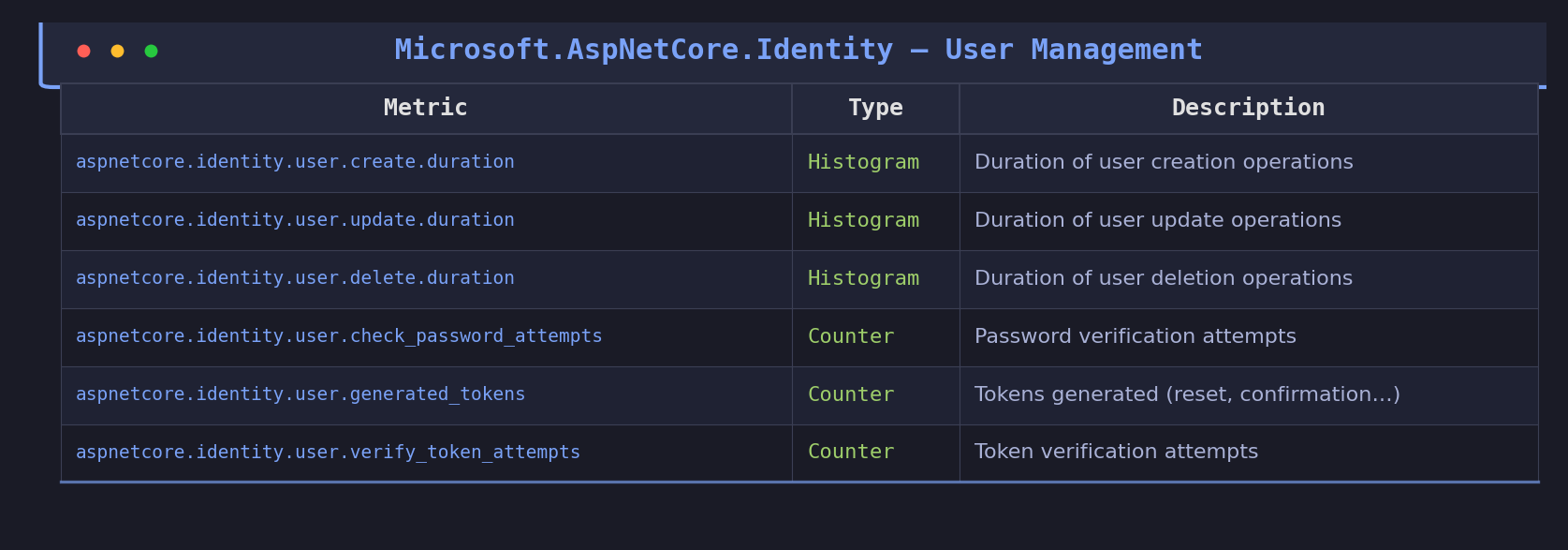
User management metrics
These track the core CRUD operations on users and their credentials:
Sign-in metrics
These capture the full sign-in lifecycle, including 2FA:
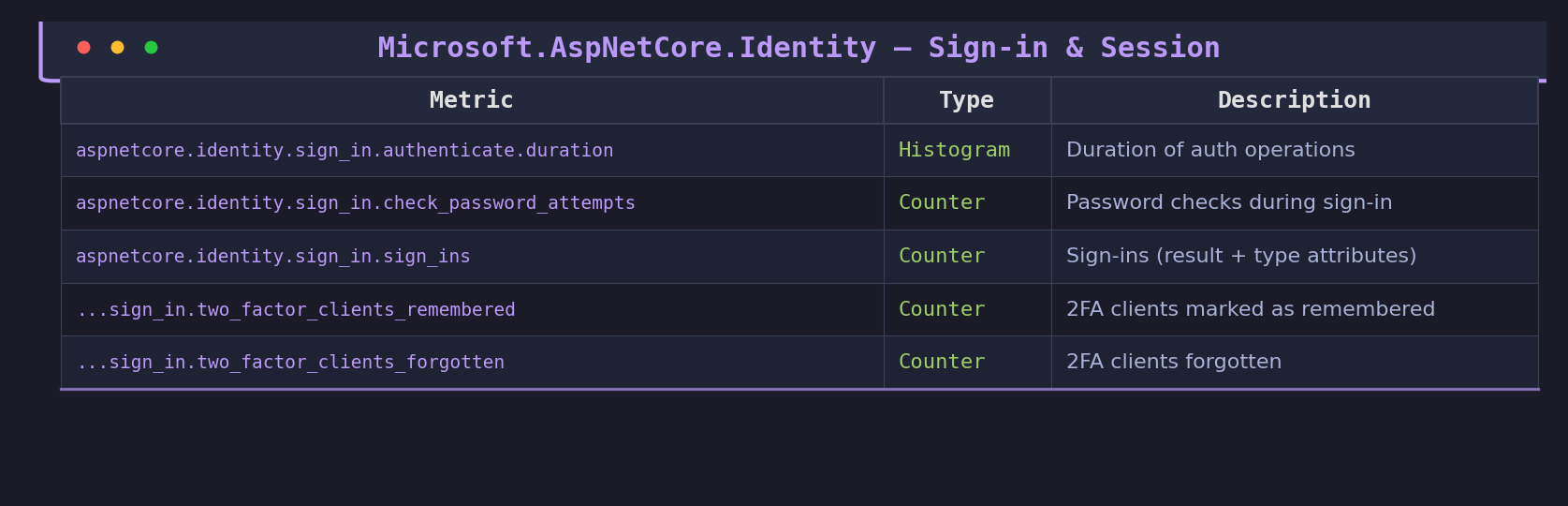
The sign_ins counter carries two important attributes: aspnetcore.identity.sign_in.result (values like success, failed, locked_out, not_allowed) and aspnetcore.identity.sign_in.type (password, two_factor, external). These let you slice the data by outcome and authentication method in your dashboards.
Verifying locally with dotnet-counters
Before you set up a full Prometheus stack, you can verify the metrics are flowing with dotnet-counters. Just run your app and point it at the Identity meter:
dotnet-counters monitor -n YourAppName --counters Microsoft.AspNetCore.Identity
Trigger a few sign-ins and you should see the counters ticking. This is the fastest way to confirm everything is wired up correctly.
A concrete example: alerting on sign-in failures
Let’s say you want to alert when sign-in failures spike, a classic indicator of a brute-force attack or a misconfigured identity provider. One important note first: Prometheus transforms .NET metric names by replacing dots with underscores and appending _total to counters. So aspnetcore.identity.sign_in.sign_ins becomes aspnetcore_identity_sign_in_sign_ins_total in PromQL. With that in mind:
sum(rate(aspnetcore_identity_sign_in_total{aspnetcore_identity_sign_in_result="failed"}[5m]))
  /
sum(rate(aspnetcore_identity_sign_in_total[5m]))
  > 0.3
This fires when more than 30% of sign-in attempts over a 5-minute window are failures. Before ASP.NET Core 10, building this required custom middleware or event handlers feeding into your own counters. Now it’s a one-liner on top of built-in data.
You can also build a Grafana panel breaking down sign-ins by type (password vs two_factor vs external) to understand how your users actually authenticate, or monitor user.check_password_attempts to spot anomalies in password verification volumes.
The bigger picture: Microsoft.AspNetCore.Authorization
ASP.NET Core 10 also ships a new Microsoft.AspNetCore.Authorization meter that tracks authorization check outcomes with an aspnetcore.authorization.result attribute. Adding it alongside the Identity meter completes the security telemetry chain:
HTTP request lands (Hosting meter) → gets routed (Routing meter) → user is authenticated and signs in (Identity meter) → authorization is evaluated (Authorization meter).
Just add “Microsoft.AspNetCore.Authorization” to your AddMeter call and you get the full picture.
Conclusion
This isn’t a flashy feature, but it fills a real observability gap. Before .NET 10, the built-in meters stopped at the HTTP and routing layers, everything past that was on you to instrument. Now, Identity operations (sign-ins, token flows, user management, 2FA) and authorization decisions are first-class metrics, following the same OpenTelemetry semantic conventions as the rest of the framework. One AddMeter line, a dotnet-counters check, and you’re in production with metrics that matter.
For the implementation details, check the source in SignInManager.cs and the metrics documentation issue.
